
I. Core Testing Logic: The Design Essence and Targeted Nature of Text Areas
(1) Test Sample Design of Text Areas
1. Typeface and Size Design
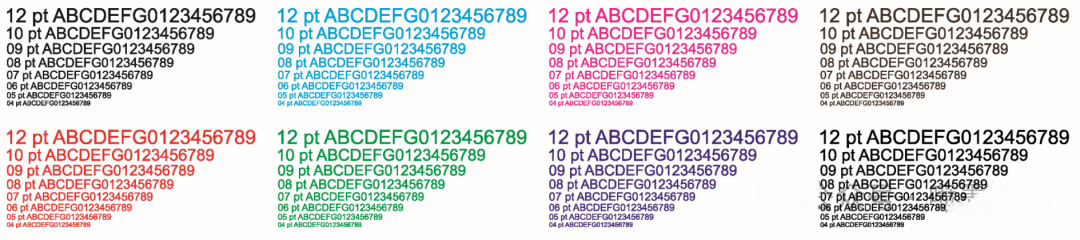
The test samples include two core types of fonts, based on ISO 12647-2 printing standards and digital inkjet industry specifications:
- Standard typefaces:
Select serif and sans-serif fonts (e.g., Song typeface and Heiti), covering font sizes from 6pt to 72pt (common office and printing sizes).
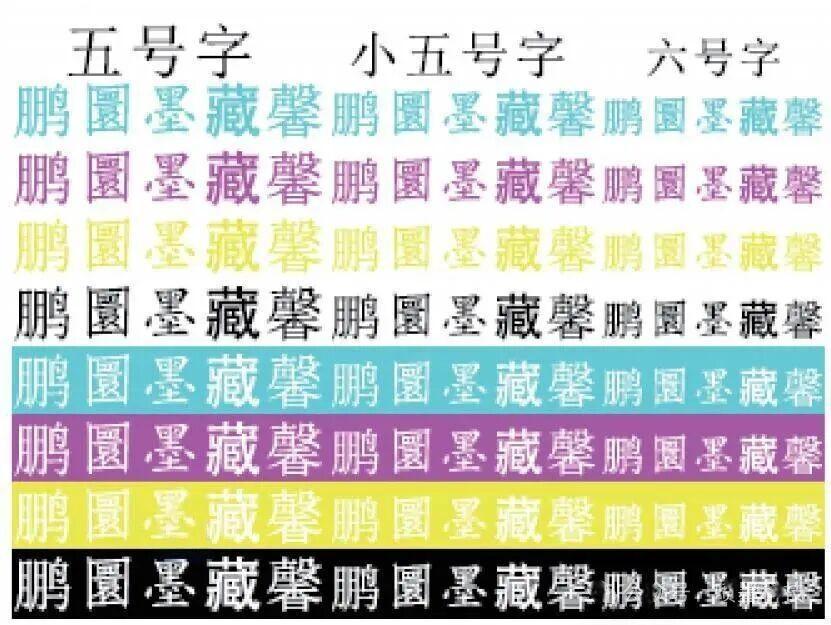
Include:- Standard characters (e.g., “中, A, 1”)
- Fine-stroke characters (e.g., “十, 一, 丨”)
- Complex characters (e.g., “繁, 馨, 器”)
→ to comprehensively verify clarity across different stroke structures.
- Reverse (knockout) text:
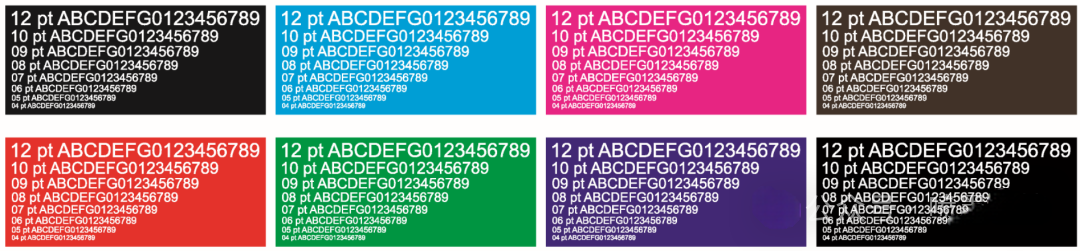
Includes:- White text on black background (high ink coverage background + knockout text)
- Black text on white background (no ink background + high ink coverage text)
→ same sizes as standard text, specifically used to magnify defects such as jagged edges and ink bleeding.
Reverse text is more sensitive to ink diffusion and edge control.
Layout requirement:
Same font size and type per row, with spacing ≥ 5 mm to avoid interference between adjacent characters.
2. Functional Differences Compared with Other Detail Tests
| Test Module | Core Validation Target | Testing Logic | Application Scenario |
| Text Area | Text clarity (edge sharpness, no merging/breaking) | Visual + magnified inspection | Documents, packaging labels, advertising text |
| Siemens Star / Radial Lines | Resolution & directional consistency | Line width threshold analysis | General detail performance |
| Photo Resolution Area | Image texture detail | Scene-based evaluation | Imaging, art reproduction |
Core conclusion:
The text area is a highly targeted detail test module, focusing on stroke transitions, intersections, and fine lines—better aligned with real-world applications like documents and packaging.
II. Core Testing Functions: Clarity Verification of Standard and Reverse Text
(1) Clarity Evaluation Criteria (Visual + Instrumental)
Key Evaluation Metrics
| Metric | Pass Standard | Failure Indication |
| Edge Sharpness | No jagged edges or bleeding; no feathering under 20× magnification | Jagged/wavy edges, gray halos in reverse text |
| Stroke Integrity | No breaks or thinning in fine strokes (e.g., 6pt text) | Broken strokes, ink accumulation at intersections |
| Shape Accuracy | No distortion (tilt/curvature); no shrinking/overflow in reverse text | Deformation, inward shrinkage or outward bleeding |
| Contrast | Clear contrast without haze | Blurry contrast, grayish text |
Size-Based Strictness
- Small fonts (6–12pt)
→ Critical for fine stroke integrity (line width ~0.1 mm)
→ Core indicator of clarity - Large fonts (24–72pt)
→ Focus on uniformity and no merging
→ Avoid “bamboo-joint” defects (uneven thickness)
(2) Focus Differences Between Text Types
1. Standard Text (Positive Printing)
Verifies precise ink deposition capability:
- Fine strokes → continuity of micro-droplet ejection
- Complex characters → control of droplet accumulation at intersections
2. Reverse Text (Defect Amplification)
More sensitive to defects:
- White on black → reveals ink diffusion (gray edges)
- Black on white → reveals edge feathering and waveform issues
III. Key Technical Factors Affecting Text Clarity
(1) Hardware Factors
1. Printhead & Droplet Control
- Resolution ≥ 1200 dpi required for small text
- Nozzle consistency deviation > 5% → uneven strokes
- Variable droplet size (e.g., 3.5–27 pl) improves edge and fill quality
2. Media Transport & Positioning
- Vertical resolution < 600 dpi → staircase edges
- Speed fluctuation > ±1% → uneven strokes
- Registration error > ±0.01 mm → ghosting in color text
(2) Software & Process Factors
1. Edge Enhancement Algorithms
- Predict ink diffusion and adjust droplet size
- Poor algorithms → jagged edges even with good hardware
2. Ink & Media Compatibility
- Low-viscosity, fast-drying ink reduces bleeding
- Slow drying (>30s) → merging
- Low-absorption media (coated paper) → sharper edges
(3) Environmental Factors
- High temperature (>30°C) → increased diffusion
- Low humidity (<40%) → static interference
- Optimal condition: 23±2°C, 50±5% RH
→ improves clarity by >30%
IV. Impact on Printing Quality
(1) Application Impact
1. Document Printing
- Small text clarity determines readability
2. Packaging & Branding
- Edge sharpness affects brand perception
3. Advertising
- Large text uniformity impacts visual impact
(2) Indicator of System Performance
Text clarity reflects multi-system coordination:
- Good standard text but poor reverse text → ink diffusion issue
- Good large text but broken small text → insufficient resolution
V. Industry Applications & Optimization
(1) Daily Inspection
- Visual check + 20× magnifier
- Check 6pt characters and reverse text
- Trigger cleaning or calibration if abnormal
(2) Batch Production Monitoring
- Sample every 100 prints
- Focus on small text integrity
- Ensure consistency across batches
(3) Equipment Selection Criteria
- 6pt text: no breaks, ≤3-pixel jagging
- Reverse text: blur ≤0.02 mm
- 72pt text: uniform strokes
(4) Optimization Cases
- Increase droplet size (3.5 → 4.0 pl) → eliminate breaks
- Reduce ink viscosity → reduce gray edges
- Optimize timing → eliminate merging
VI. Key Testing Precautions
1. Observation Conditions
- Use 20–50× magnification for small text
- D50 standard lighting required
2. Sample Representativeness
- Use real production materials
- Avoid misleading results from different substrates
3. Coordination with Other Tests
- Jagged edges + good resolution → algorithm issue
- Gray edges + good density → ink/media issue