
Ink must remain smooth, stable, and free from interruption in order to produce high-quality print output. Below is an analysis of several causes that affect ink stability and lead to nozzle dropouts (broken lines):
Waveform and Ink Mismatch
In digital inkjet printing, mismatch between waveform and ink is one of the core causes of nozzle dropouts. It is mainly caused by resonance abnormalities resulting from incompatibility between the physical properties of the ink (such as sound velocity and specific gravity) and the printhead driving waveform, which affects ink ejection stability.
Cause Analysis
Conflict Between Sound Velocity and Waveform:
The sound velocity of ink varies significantly in different media (gas, liquid, solid). High sound velocity inks (such as water-based inks) cause resonance waves to reach the printhead prematurely. If the driving waveform is not properly adapted, ink ejection becomes chaotic, forming dropouts or banding.
Mismatch of Ink Physical and Chemical Properties:
Ink density and temperature response (such as accelerated ink residue at high temperatures) may be incompatible with waveform design, resulting in uneven ink flow or localized clogging, especially aggravating dropouts during continuous printing.
Additional Environmental Factors:
Failure to update drivers for extended periods or changes in environmental humidity may amplify waveform-ink mismatch, leading to unstable ink supply (though this is not the primary cause).
Solutions
Adjust Printhead Driving Waveform:
Optimize waveform parameters (such as pulse width and frequency) according to the measured sound velocity of the ink using professional calibration tools to ensure compatibility with ink density and temperature characteristics.
Match Ink Type:
Select inks with sound velocity values compatible with the printhead model (for example, oil-based inks have lower sound velocity and can reduce resonance interference).
Maintenance and Inspection:
Regularly run nozzle check procedures, calibrate and deep-clean the printhead. If dropouts occur frequently, inspect cartridge sealing and remove air from ink dampers to ensure continuous ink supply.
For waveform-ink mismatch dropouts, the core solution lies in customized waveform optimization and ink consistency management. Routine maintenance only provides auxiliary relief.
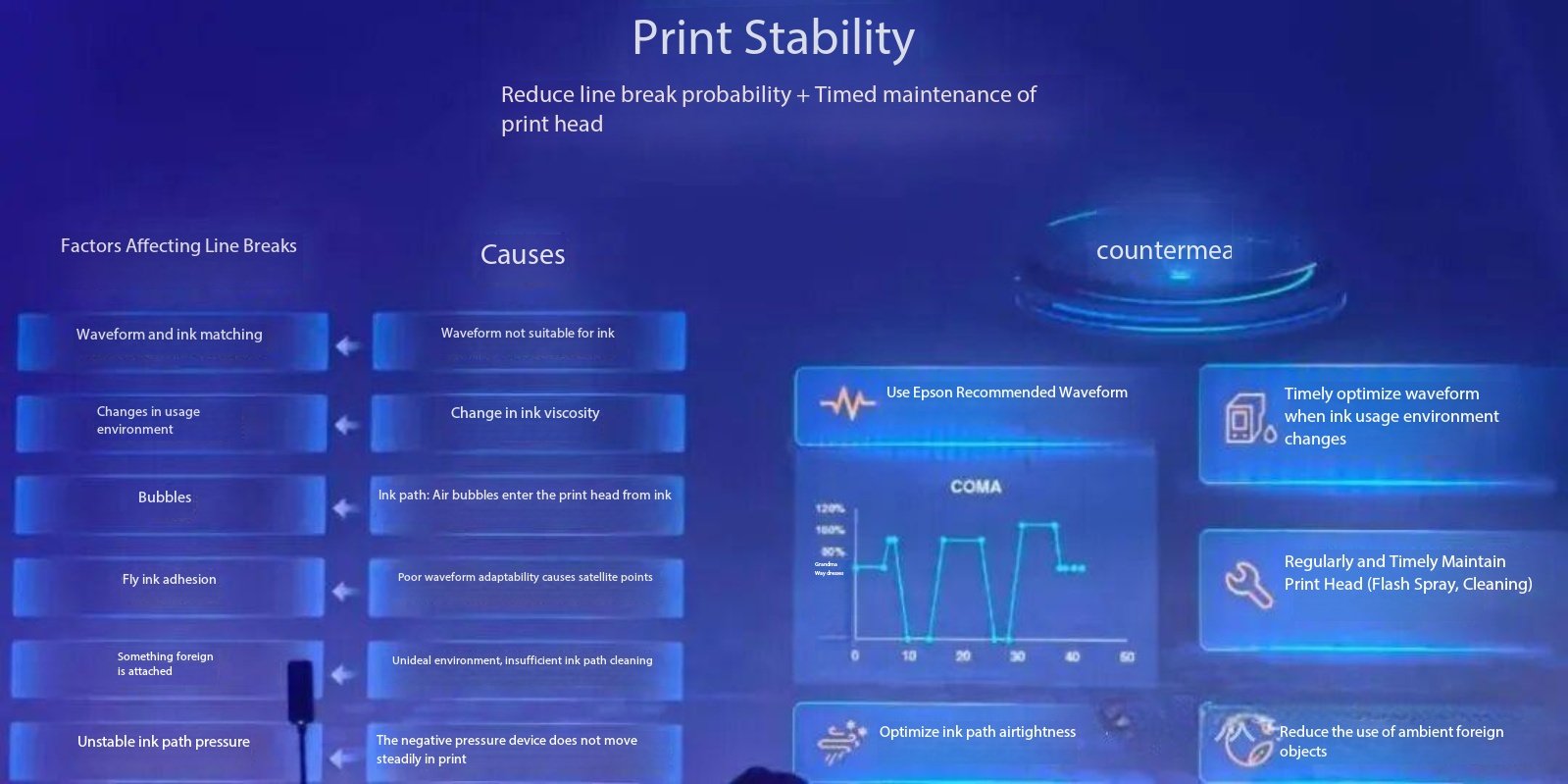
Environmental Changes Affecting Ink Viscosity
In digital inkjet printing, environmental factors (temperature/humidity) causing abnormal ink viscosity are a major cause of dropouts.
I. Core Cause Analysis
Temperature Fluctuation Affecting Viscosity:
Low temperatures increase ink viscosity and reduce fluidity, causing poor ink supply. High temperatures accelerate solvent evaporation, causing ink to dry and clog the nozzle. A temperature difference greater than 10°C significantly increases dropout risk.
Abnormal Humidity Causing Drying Issues:
Low humidity (<40%) causes ink to dry too quickly, forming crystalline deposits on the nozzle surface. High humidity (>70%) delays drying, leading to ink misting or head flooding.
Synergistic Effect of Environment and Ink Properties:
Water-based inks are more sensitive to temperature and humidity changes. Their viscosity and surface tension can vary by up to 30%, far exceeding the tolerance threshold of the printhead.
II. Systematic Solutions
(1) Environmental Control Measures
Temperature and Humidity Regulation:
Maintain working environment at 15–30°C and 40–60% humidity. Use constant-temperature air conditioning and humidifiers for real-time control. Preheat equipment 2 hours in advance during extreme climates.
Equipment Protection Upgrade:
Install insulation covers in the printhead area and wrap ink lines with heating belts (set at 40±5°C).
(2) Ink Adaptation Management
Dynamic Viscosity Calibration:
Maintain ink within the proper viscosity range based on viscosity-temperature curves.
Select Environment-Adapted Consumables:
Use low-viscosity antifreeze ink in cold regions and slow-drying solvent ink in high-temperature environments.
(3) Proactive Maintenance Strategy
Workflow:
Daily startup → Print nozzle check pattern
If abnormal → Perform 2 standard cleanings
If unresolved → Inject cleaning solution and soak for 10 minutes
Then → Flush with large ink volume
Regular Deep Maintenance:
Monthly circulation cleaning with original cleaning solution to remove crystalline residues. If machine idle exceeds 72 hours, execute sealing and moisture retention procedure.
III. Emergency Handling Process
When dropouts occur:
- Pause printing immediately and run the built-in printhead cleaning program (max 3 times).
- If not restored, remove cartridge and soak nozzle in 40°C warm water for 3 minutes (avoid circuit contact).
- Install empty cartridge filled with cleaning solution and perform siphon cleaning until test pattern is complete.
Key Reminder:
Persistent dropouts require testing ink conductivity and pH value. Replace entire batch if abnormal.
Air Bubbles in Ink Path or Ink Entering Printhead
Air bubbles interrupt continuous ink flow, forming cavities during ejection.
I. Causes
Ink Supply System Seal Failure:
Loose connectors, cracked dampers, or aging filters allow air infiltration.
Improper Operation Introducing Air:
Overfilling cartridges (>80% capacity) or insufficient resting time (2–3 hours recommended).
Failure to purge air during cartridge replacement.
Ink and Environment Synergy:
High temperature (>30°C) accelerates solvent evaporation; low-viscosity ink foams easily. Poor-quality ink lacks sufficient defoaming agents.
II. Solutions
Emergency Flow:
Test page dropout → Check if periodic blank
Yes → Perform 2–3 self-clean cycles
No → Check external cartridge liquid level
Ensure liquid level 30 cm above printhead
Press damper exhaust to remove bubbles
If bubbles accumulate near printhead, open ink tube plug and press ink supply button until ink flows continuously.
Systematic Measures:
- Strengthen sealing (replace cracked tubes, tape connectors).
- Fill ink ≤80% capacity and rest 3 hours.
- Use ink with defoaming agents (≤0.3%).
- Use high-viscosity anti-foam ink in high-temperature environments.
Deep maintenance includes negative pressure exhaust and monthly cleaning cycle.
Warning: Never inject liquid directly into the printhead.
Poor Waveform Adaptation Causing Satellite Droplets
Satellite droplets result from abnormal droplet splitting due to mismatch between waveform and ink properties.
Causes
- Excessive voltage rise rate causes droplet tail splitting.
- Incorrect oscillation timing interrupts droplet separation.
- Low-viscosity ink (<3cP) more prone to satellite formation.
Solutions
- Reduce voltage rise rate to 5–10V/μs.
- Adjust pulse width to 1–2μs.
- Match oscillation phase using oscilloscope.
- Control ink viscosity within 3–8cP.
- Add 0.1%–0.3% surfactant.
Regular waveform calibration and deep printhead cleaning required.
Poor Environment, Insufficient Ink Path Cleaning, Foreign Matter Adhesion
Causes
- Unstable temperature and humidity cause ink crystallization.
- Lack of regular deep cleaning leads to sediment buildup.
- Use of expired or poor-quality ink.
- Inadequate sealing during shutdown allows dust intrusion.
Solutions
- Maintain 15–28°C stable environment.
- Use certified original ink.
- Daily nozzle check and cleaning.
- Monthly full ink path flushing.
- Seal printhead with plastic wrap during long downtime.
Unstable Negative Pressure During Printing
Negative pressure imbalance disrupts ink flow equilibrium.
Causes
- Seal failure introducing air.
- Ink viscosity changes from temperature fluctuation.
- Faulty negative pressure regulation devices.
- Liquid level sensor errors.
Emergency Handling
Test dropout → Check pressure gauge fluctuation
If yes → Manually calibrate pressure
Adjust range to -0.5 to -1.0 kPa
Systematic Repair
- Replace cracked tubes and dampers.
- Clean check valves.
- Stabilize temperature (15–28°C).
- Replace filters monthly.
Preventive Maintenance
Daily: Check pressure fluctuation (±0.2 kPa threshold).
Weekly: Air tightness test.
Monthly: Replace filter and flush system.
Warnings
- Do not unplug printhead cables while powered on.
- Do not apply pressure settings across different printer models.
- Persistent instability requires professional inspection.