
1) Dedicated Ink Supply System Maintenance: Adapting to Single-Path Ink Pressure and Cleanliness Control
The KM800/1600 features a “single-path ink supply + passive ink return” simplified ink supply design (no active circulation pump). Ink delivery relies on gravity and ink pump negative pressure, requiring precise control over pressure stability and channel cleanliness to avoid consistency deviations during wide-format printing:
1. Precision Ink Supply Pressure Control
- Basic Pressure Setting Boundaries: Ink supply pressure should be stable at 0.015-0.025MPa, lower than the circulating system pressure of the KM1024a. Since the single-path ink supply lacks return pressure buffering, pressure exceeding 0.03MPa may cause ink chamber overpressure (with the aluminum alloy chamber tolerance limit at 0.04MPa), leading to ink leakage from nozzles. Pressure below 0.01MPa causes inkjet power loss, leading to missing lines. It is recommended to use a manual pressure control valve with a digital pressure gauge and record the pressure every 30 minutes. If fluctuations exceed ±0.005MPa, immediate calibration is required.
- Liquid Level and Pressure Linked Control: The ink bottle’s liquid level should remain within ±5cm of the printhead’s height. For every 10cm drop in liquid level, pressure should be adjusted up by 0.002MPa. Low liquid levels will cause ink supply flow rate to decrease (<0.5mL/min), leading to over 10% nozzle ink drop insufficiently. Do not refill ink when the ink bottle is nearly empty; always reserve 10% ink to prevent air from entering the system during refilling.
2. Multi-Level Cleanliness Protection for Ink Channels
- Filter System Configuration: Only a 1μm precision filter is required at the ink intake end (no need for return ink filtering). The filter should be replaced every 500 square meters of printing or 48 hours. When replacing, first perform the “depressurization procedure” (release ink path pressure through software), then remove the filter to avoid ink residue spreading impurities—single-path ink systems lack circulation washing, and once impurities enter, they are difficult to remove.
- Regular Ink Channel Flushing Strategy: After daily shutdown, use a dedicated cleaning solution (viscosity 5-8cP) to manually flush with a pressure of 0.02MPa for 3 minutes until the outflow is color-free (compared to blank cleaning liquid). Once a month, disassemble the ink supply joints and use compressed air (pressure 0.01MPa) to reverse flush the ink path to clear dried ink residue on the pipe wall—slow ink flow in wide-format printing makes single-path ink systems more prone to deposition.
3. Bubble Prevention Key Points
- Initial Air Release Protocol: After installing a new printhead, perform the “negative pressure exhaust” by using the ink pump to generate a -0.005MPa negative pressure to reverse draw ink from the printhead to the ink bottle for 1 minute, then forward feed for 2 minutes while gently squeezing the ink supply tube (squeeze every 10cm) to expel air bubbles. After exhaust, print a 3-meter test strip to ensure all 1600 nozzles (KM1600 model) are operational with a blockage rate below 2%.
- Bubble Monitoring During Operation: Check the ink supply tube every hour for air bubbles (diameter >1mm). If present, stop the machine immediately and inspect the joint seals. Single-path ink systems lack circulation exhaust functions, and bubbles in the ink chamber will cause nozzle failure (with a wider impact than in a circulating system, by 3 times), requiring a “high-pressure cleaning + negative-pressure bubble removal” operation.

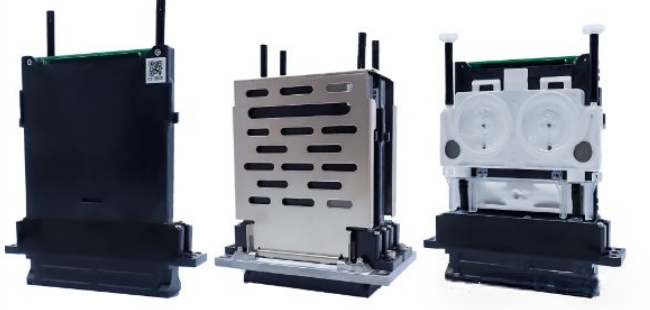
2) Mid-Speed Drive Adaptation: Matching Consumables and Environmental Control for 30kHz Performance
The KM800/1600 operates at a 30kHz drive frequency (half of the KM1024a), focused on wide-format printing (single printhead width ≥320mm). It is more flexible with consumable compatibility but requires adapting to the large droplet (20-40pL) output characteristics:
1. Practical Consumable Matching Standards
- Ink Parameter Tolerance Range: Viscosity can be adjusted within the 10-30cP range (at 25°C), more flexible than KM1024a’s high-precision requirements. Water-based and weak solvent inks are both compatible, but the particle diameter must be ≤1.5μm (with nozzle hole diameter 25μm, larger than KM1024a). It is recommended to use Konica Minolta certified ink, and non-certified inks must undergo 48 hours of printing testing to confirm no blockage or corrosion (check for residue in the ink channel). Be cautious of hidden risks with compatible inks—there have been cases where incompatible inks with insufficient filtration caused 15% nozzle blockages after printing 200 square meters, with repair costs far exceeding ink price differences.
- Auxiliary Consumable Selection: Use ordinary ultra-fine fiber material for moisture cotton, replacing it every 72 hours, ensuring coverage over all nozzles (for KM1600, 320mm width). The gap can be relaxed to 0.3mm (no precision fitting required). Do not mix cleaning liquids with alcohol-based solvents as they can corrode the ink supply tube’s rubber seals, leading to ink leakage and contamination.
2. Environmental Parameter Control Flexibility
- Temperature and Humidity Range: The temperature should be maintained between 18-32°C (with fluctuation ≤±3°C), and humidity between 40%-70% (fluctuation ≤±10%), which is more easily met than the rigid requirements of the KM1024a. In high temperatures (>32°C), workshop ventilation is sufficient without a dedicated cooling system. The printhead temperature during mid-speed driving will not exceed 38°C, with no overheating risk. In low humidity (<40%), grounding (resistance <10Ω) is sufficient as large droplets are less sensitive to static electricity (the droplet offset of 20pL is only 1/3 of the 6pL offset).
- Basic Cleanliness Guarantee: A Class 8 clean environment is sufficient (≥0.5μm particles ≤3.52 million per cubic meter), and no dust work should occur within 0.5 meters of the printhead. Wipe the nozzle surface with a dry dust-free cloth before starting each day, and avoid using isopropyl alcohol as excessive cleaning can damage the nozzle’s ink repellent coating (which is 5μm thicker than the KM1024a, making it more wear-resistant).
3) Wide-Format Structural Protection: Loss Prevention for Large Printhead Area
The printhead length of the KM800/1600 is ≥350mm (for the KM1600 model), and the nozzle arrangement density is 5 nozzles/mm, which makes it more prone to local wear than the KM1024a’s long-format structure. Therefore, standardized operations are required to extend the overall lifespan:
1. Start and Stop Operation Norms
- Two-Step Startup: ① Start the ink supply system and wait for 5 minutes to stabilize pressure; ② Perform automatic cleaning (1 strong cleaning + 1 light cleaning) before printing the test strip. Do not directly start the drive power—single-path ink supply requires more time to establish pressure balance, and cold-start ink starvation can cause piezoelectric elements to vibrate, reducing driving efficiency by 8% after 20 occurrences.
- Intermittent Maintenance Strategy: After printing continuously for 1 hour, pause for 10 minutes and perform “full moisture maintenance” (cover the entire nozzle area with a moisture cover). If the pause exceeds 2 hours, manually inject protective fluid into the ink chamber (5mL per printhead) to prevent ink solidification in the long ink path. Wide-format printheads with many nozzles are prone to local drying, which can cause contiguous blockages that are much harder to repair than small printheads.
2. Cleaning and Blockage Handling Norms
- Cleaning Method Control: Daily maintenance should focus on “light cleaning” (pressure 0.015MPa, ≤3 times/day), and one “strong cleaning” (pressure 0.025MPa) per week. Do not use ultrasonic cleaners—piezoelectric element solder points on wide-format printheads are fragile, and ultrasonic vibrations can cause solder joints to loosen, leading to nozzle failure.
- Blockage Handling Process: When a blockage occurs, first print a positioning strip to mark the blocked area and use a dedicated needle (diameter 18μm) to clean each nozzle. The insertion depth should not exceed 3mm (with nozzle hole length 4mm). If more than 20 consecutive nozzles are blocked, disassemble the printhead and soak the ink path (in cleaning solution for 24 hours). Do not use high-pressure cleaning, as the aluminum alloy ink path can deform under high pressure.
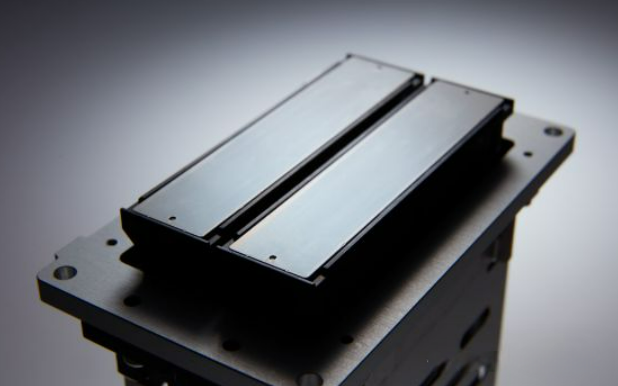
4) Fault Prevention and Emergency Handling: Quick Response for Wide-Format Conditions
1. Typical Abnormal Diagnosis and Disposal
- Abnormal Ink Supply Pressure: If pressure suddenly rises (>0.03MPa), check the filter first (90% probability of blockage) and replace the filter. If the pressure continues to rise abnormally, check for ink path blockages. If pressure drops suddenly (<0.01MPa), inspect the ink supply tube for damage (single-path system has no pressure compensation, and any damage results in pressure loss). Do not continue printing under low pressure conditions.
- Local Missing Lines Handling: In wide-format printing, horizontal missing lines (along the printing direction) are often due to insufficient ink supply in that area. Check whether the ink distribution tube is bent in that area. Vertical missing lines (perpendicular to the printing direction) indicate nozzle blockages, requiring targeted cleaning without using strong cleaning for the entire group.
- Ink Droplet Offset Correction: When print images show a 3-pixel ghosting effect, first calibrate the printhead installation precision (horizontal deviation ≤0.1mm), then adjust the voltage parameters of the driving waveform (increase 0.5V per grayscale level). In mid-speed operation, the influence of waveform parameters on ink droplet offset is smaller than installation accuracy.
2. Lifespan Management and Scrap Criteria
- Key Indicator Monitoring: After 2000 hours of cumulative use, check the nozzle continuity rate monthly (≥97%), and ink droplet diameter deviation (adjust if it exceeds ±15%). After printing 10,000 square meters, perform a “full performance check,” including ink consistency across different regions (deviation ≤10%).
- Unrepairable Conditions: When more than 5% of nozzles are blocked (more than 80 nozzles for KM1600), if the ink path shows permanent leakage (even after cleaning), or if the piezoelectric element’s driving delay exceeds 0.5μs, scrap the printhead immediately. Wide-format printheads have high repair costs (60% of the new printhead price), and repairing them often results in inconsistent printing, leading to higher scrap rates.
5) Long-Term Storage and Transportation Protection: Protective Measures for Long-Format Structures
- Short-Term Storage (<7 Days): No need to maintain the ink supply system. Execute the “empty + moisture maintenance” procedure: First, empty the ink path with cleaning solution, then cover with moist cotton and store at 20-28°C and 50%-60% humidity. Change the moisture cotton daily.
- Long-Term Storage (>7 Days): Inject dedicated anti-rust protective fluid (with corrosion inhibitors) into the ink path, seal both ends with plugs, and place it in a custom foam package (matching the printhead length and width). During transportation, ensure that vibration amplitude is controlled to ≤0.1mm (wide-format structures are more resistant to vibration than the KM1024a’s miniature structure) to avoid impact damage to the nozzle surface.