
When you notice that the printed pattern of a UV flatbed printer is misaligned—shifted left or right, up or down—it indicates an XY axis displacement issue. Printing should be paused immediately. Since the X and Y axes have different mechanical structures and components, the causes and solutions also differ.
1. X-Axis Misalignment in UV Flatbed Printer Printing
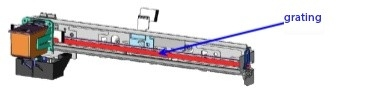
A. Worn grating strip
Solution: Replace with a new grating strip.
B. Improper installation of the encoder
Solution: Reinstall the encoder properly.
C. Loose X-axis belt
Solution: Tighten the X-axis belt.
D. Damaged optical fiber cable
Solution: Replace with a new optical fiber cable.
E. Image frame mismatch
Solution: Recreate the image frame to ensure proper alignment.
F. Bidirectional alignment not calibrated
Solution: Calibrate the bidirectional parameters in the software.
G. Mainboard malfunction
Solution: Contact the manufacturer to replace the control board.
2. Y-Axis Misalignment in UV Flatbed Printer Printing

A. Loose Y-axis belt
Solution: Tighten the Y-axis belt.
B. Loose motor transmission belt
Solution: Tighten the motor transmission belt; if it’s aged, replace it with a new one.
C. Abnormal Y-axis software parameters
Solution: Reset the Y-axis parameters to their default values.
D. Software malfunction
Solution: Reinstall the printing control software.
E. Damaged optical fiber cable
Solution: Replace with a new optical fiber cable.
F. Large clearance in the synchronous gear
Solution: Adjust and reduce the gap in the synchronous gear.
G. Large clearance in the drive shaft gear
Solution: Adjust and reduce the gap in the drive shaft gear.
H. Mainboard malfunction
Solution: Contact the manufacturer to send and replace the board.